

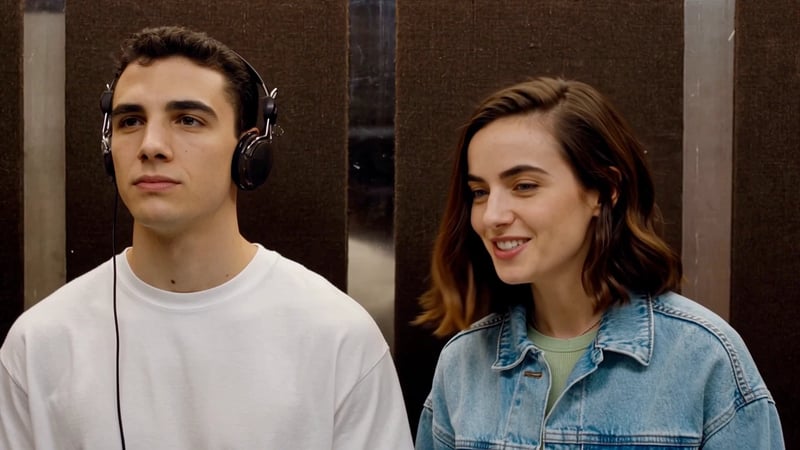
I Love the Smiths AI Video Generator
Make an I Love the Smiths AI video from two photos. Recreate the elevator scene with your own cast, black headphones and original dialogue and music in 720p.
Choose who wears the headphones and who starts the conversation. Upload a photo of yourself and a partner, a friend who shares your playlists, or two people you want to cast together. This template puts your chosen pair into the familiar elevator exchange, including the departure and the small reaction that closes the scene.
Choose Your Two I Love the Smiths Characters
Each upload controls a different role. Left and right refer to the characters' positions at the beginning of the video, so decide who should play each part before replacing the example photos.
| Photo input | Who appears in this role | What happens in the scene |
|---|---|---|
| Left · Headphones | The person listening to music | Takes off the black headphones, responds to the conversation and remains for the final reaction |
| Right · Starts the conversation | The person who notices the music | Starts the exchange and later walks out of the elevator |
The roles are not tied to gender. Swap the two uploaded photos to reverse them. You do not need to match the original actors' clothes, hairstyle or pose when taking your pictures.
How to Make an I Love the Smiths AI Video
- Choose two photos. Use a separate image for each person. Check the role labels and replace both example images with your choices.
- Review and generate. Confirm the two thumbnails show the intended people. Sign in and check the fixed 1,200-credit price before selecting Generate. The scene instructions, reference video and soundtrack are already prepared.
- Watch and download. Play the completed result with sound. Check both characters through the conversation and ending, then use Download result to save your video.
The template creates an approximately 24-second landscape video in 16:9 at 720p. You can make your version in the browser without filming the conversation or editing the shots together.
The Full I Love the Smiths Elevator Scene
The moment comes from (500) Days of Summer: a shared taste in music turns an ordinary elevator ride into an unexpected connection. The appeal is in the short exchange and the expression it leaves behind. Casting yourself and someone you know gives that familiar moment a personal twist.
The example follows the scene through its ending:
- The headphones and conversation. The person on the right notices the music and starts talking. The person on the left takes off the headphones to respond.
- The elevator exit. The exchange ends, and the person on the right leaves while the other stays behind.
- The final reaction. The camera remains with the person on the left, including the slight opening of the mouth at the end.
Watch the full preview above when choosing your cast. For a partner, the scene can become a playful movie moment together; for a friend, it can be a joke about the music you both love.
What the I Love the Smiths Template Changes and Keeps
Your photos guide each person's face, hair and clothing. This is a character-replacement video, so the image can influence the whole visible appearance rather than just the face. Choose a photo that shows the outfit you want to bring into the elevator.
The reference supplies the setting, conversation timing and performance. The left character keeps the black headphones from the scene, even when the uploaded portrait has no headphones. The finished video includes the original reference dialogue and music, with the exit and closing reaction carried through to the ending.
These details are visible in the example. Use it to judge the scene and pacing, then review your own result for likeness and clothing through the turns and expressions.
Photo Tips for Your I Love the Smiths Video
Choose a sharp, evenly lit portrait with the face unobstructed. A front-facing or slightly turned view gives a clear reference for the conversation. Keep one person in each image and avoid sunglasses, hands across the face or filters that alter facial features.
Include the shoulders and upper body when clothing matters. A tightly cropped selfie supplies less information about a jacket or shirt; an upper-body photo makes those choices clearer. Neither person needs to pose in an elevator or recreate a frame from the movie.
If your only picture is a photo together, crop each person into a separate image while keeping enough detail around the face and shoulders. Before generating, check that neither crop includes part of the other person's face.
I Love the Smiths AI Video Questions
Do I need CapCut, a movie clip or a prompt?
No. This page includes the prepared scene and generation instructions. Replace the two photos and generate directly in Vhoo. You can use a separate editor afterward if you want to add captions or combine the result with other clips.
Will the video use our voices?
It uses the original reference dialogue and music. Uploading a portrait changes the person on screen; it does not record or clone that person's voice. You do not need to upload an audio file.
Do my photos need to include headphones?
No. Upload a clear portrait in the clothes you want to use. The template keeps the left character's black headphones from the reference scene.
Is it only a face swap?
The photos guide the characters' faces, hairstyles and outfits. Include visible clothing in your references if you want the result to follow it. Review the generated video because small appearance details can vary during movement.
Can I share it on TikTok or Instagram Reels?
Yes, you can download the clip for your post. The output is landscape, so for a vertical edit, place it within a 9:16 frame and keep both people visible. Preview the exit before cropping, since the second person moves toward the edge of the scene.
Is generation free?
Each generation costs a fixed 1,200 Vhoo credits and requires an account. The amount appears on the Generate button before you start. See Vhoo pricing for credit options.
Create Your I Love the Smiths Video
Choose who listens and who starts the conversation, then replace the two example photos above. The complete scene and original soundtrack are ready for your cast.
For another two-person story, try the AI Zombie Trend, which moves from a cabin encounter to a sunset memory. For a group performance, Tiny Desk AI lets you assign five people to the band.