

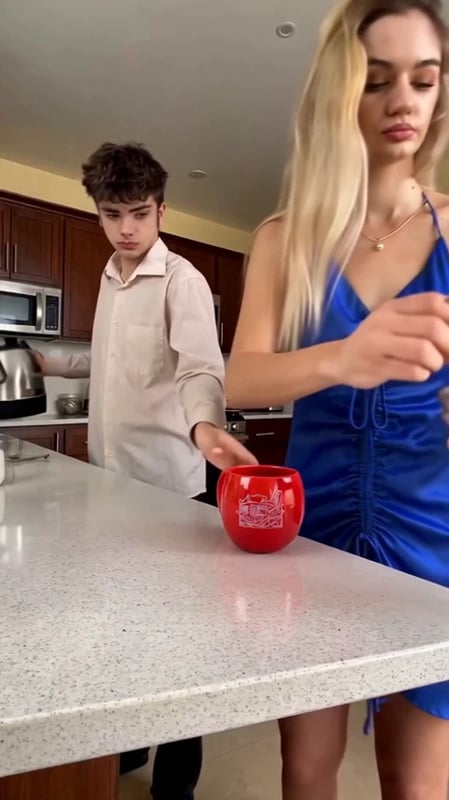
Coffee Duo AI Video Generator
Make a Coffee Duo AI video from two photos. Put yourself and a friend in the funny coffee-making scene, with left and right roles and original audio included.
Turn two photos into a Coffee Duo video. Put yourself and a friend in the kitchen comedy where making a cup of coffee becomes a messy team effort. Upload one picture for Left Person and another for Right Person, then generate your version with the original soundtrack.
The scene, movements, and editing instructions are already prepared. You do not need to film together, write a prompt, or add music yourself.
What is the Coffee Duo AI trend?
The joke starts with two people trying to make coffee. Coffee and milk land in the wrong places while the pair carry on with their routine. The AI version puts the people from your photos into that scene, turning an everyday kitchen mishap into a personalized short video.
You may have seen related videos called Cofi Trend, couple coffee mess, or coffee fail AI videos. This Coffee Duo template recreates the two-person kitchen routine shown in the preview. Watch it first to see the exact scene you will be joining.
Two photos, two roles
| Input | What to upload | Your role in the video |
|---|---|---|
| Left Person | A clear photo of the first person | The person on the left side of the frame |
| Right Person | A clear photo of the second person | The person on the right side of the frame |
Each photo guides that person's face, hairstyle, overall appearance, and clothing. The template supplies the kitchen background and the coffee-making action. Your pictures can come from different places; they do not need matching backgrounds.
How to make a Coffee Duo AI video
- Choose your duo. Pick one photo of yourself and one of your partner, friend, or sibling. Decide who should appear on each side.
- Add both photos. Sign in and replace the pictures under Left Person and Right Person. Check both thumbnails before continuing.
- Generate the scene. Review the credit amount shown beside Generate, then start. The template creates the visual edit and adds the original audio.
- Watch and download. Play the completed result with sound, then select Download result to save your video for TikTok, Instagram Reels, or YouTube Shorts.
The finished clip is approximately 14 seconds, in 9:16 vertical format at 480p, with sound included.
Choose photos that bring your duo to life
Use sharp photos with one clearly visible person in each. Even lighting, an unobstructed face, and a visible hairstyle give the template useful detail. An upper-body picture also shows the outfit you want to bring into the scene. If you start with a group photo, crop a separate image for each person.
Try casual portraits for a couple's breakfast joke, or use smart outfits to make the coffee disaster look unexpectedly formal. Two friends in their everyday clothes can turn the same scene into a familiar group-chat moment. Pick recognizable looks and let the prepared routine deliver the comedy.
For another performance, try the Bad Times Dance template, or browse more Vhoo video templates.
Frequently asked questions
Do I need a photo of both people together?
No. Coffee Duo uses two separate photos, with one person in each. Add them to the corresponding left and right inputs.
Will it use our clothes as well as our faces?
Yes. Each reference photo guides the person's appearance and clothing. Choose pictures showing the looks you want in the finished scene.
Does the video include the original audio?
Yes. The template adds the original soundtrack after creating the visual edit. You do not need to upload or synchronize a separate audio file.
Do I need a Cofi Trend prompt or reference video?
No. The Coffee Duo template already includes its scene reference and instructions. Your only inputs are the two photos.
Is the Coffee Duo AI video generator free?
Generation uses credits. Check the current amount beside Generate before starting, and visit Vhoo pricing for credit options.