

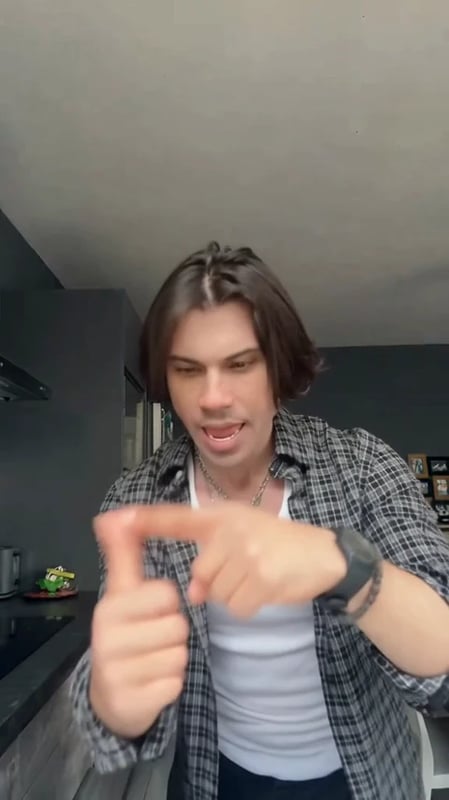
Bad Times Dance AI Video Template
Create a Bad Times Dance video from one photo. Put yourself in the angry dance routine with the template's original soundtrack, ready for TikTok and Reels.
Create a Bad Times Dance video from one photo. Put yourself in the dramatic pointing, palm gestures, and close-up reactions of the angry dance routine. Add your picture to Your Photo, check the credit cost, and generate your version.
The movement reference, editing instructions, and original template soundtrack are already prepared. You do not need to film yourself dancing, write a prompt, or upload separate video and audio files.
What is the Bad Times Dance?
The Bad Times Dance is a short performance built around exaggerated expressions and an imaginary argument with the camera. The humor comes from the sudden gestures, intense looks, and close-up reactions. AI versions put a different person into the routine using a reference photo.
You may also find this style under Bad Times AI or Angry Dance Filter. This Vhoo template follows the 15-second solo routine shown in the reference clip. The uploaded photo supplies the new person's appearance and clothing; the video reference supplies the movements, scene, and timing.
One photo, your turn in the video
| Input | What to upload | What it controls |
|---|---|---|
| Your Photo | One clear photo of one person | The person's appearance and clothing in the dance video |
Choose a photo with a sharp, clearly visible face and even lighting. A waist-up or full-body picture gives the model more information about the outfit and body. Keep sunglasses, hands, and other objects away from the face.
Use the clothing you want to appear in the finished clip. The template is designed to keep the reference video's background, so you do not need to recreate its room in your photo. A simple portrait is enough to start.
How to make a Bad Times Dance AI video
- Check the routine. Watch the template preview to see the gestures and close-up ending.
- Upload one photo. Sign in and replace the image in Your Photo. Check that the thumbnail shows the intended person.
- Generate your video. Review the current credit amount beside Generate, then submit. The template handles the performance and adds its original soundtrack.
- Review and download. Watch the completed video with sound, then use Download result to save your clip for TikTok, Instagram Reels, or YouTube Shorts.
This Bad Times Dance template is configured for approximately 15 seconds, 9:16 vertical video, and 480p. The soundtrack is added automatically after the visual edit, so the final video includes sound without a separate editing step.
Your look, the familiar routine
A calm portrait can become a playful, over-the-top reaction video. Try a casual photo of yourself for a personal post, or a friend's photo with their permission for a group-chat joke. Changing the photo changes who performs while keeping the same reference routine.
For more prepared scenes, browse Vhoo video templates. If you want a different scene or your own instructions, start with the AI video generator.
Frequently asked questions
Is this the Angry Dance Filter?
It recreates the same style of pointing, gesturing, and arguing with the camera that appears in Angry Dance template posts. Check the preview to confirm this is the Bad Times Dance version you want.
Do I need CapCut or a dance recording?
No. This is a browser-based Vhoo template. You only upload your photo; the movement reference and instructions are already included.
Does the finished video include music?
Yes. The workflow adds the original template soundtrack after generating the visual edit. You do not need to supply or align an audio file.
Will it use my face, clothes, and background?
The edit uses your photo as the reference for the person's appearance and clothing. It keeps the video reference's scene. Clear photos help the model preserve recognizable details as the person moves.
Can I use a group photo?
This version is prepared for one person. Choose a photo with a single, clearly visible subject for the intended solo performance.
Is the Bad Times Dance AI generator free?
Generation uses credits. Check the amount shown beside Generate before starting, and see Vhoo pricing for credit options.