
You have a product image you like. The composition works, the light feels right, and the object is recognizable. Then you ask an AI video model to make it “cinematic,” and the result is a moving camera, a changing product, and a background that competes for attention.
Take a coffee cup as an example: a short café product shot in which a ceramic cup stays the visual focus. This scene gives us a concrete way to explore how prompts can direct action and camera movement to support a product shot.
The prompts below are original starting points, not benchmark results. Their behavior will vary with your image, model, and settings. Use them as a controlled exercise and keep only the versions that suit your work.
Give the shot one job
Write the intended result in an ordinary sentence before writing a generation prompt:
I want a quiet café shot that draws attention to the cup’s shape and warm atmosphere.
That sentence gives you a way to reject an attractive but unsuitable result. If a dramatic orbit hides the handle, it has missed this brief. If a lighting change makes the cup look like a different material, it has also missed the brief.
Runway’s image-to-video prompting guide makes a useful distinction: the input image establishes the visual scene, while the text directs what happens over time. Its recommendations are model-specific; use that distinction as a planning aid rather than assuming identical behavior in every generator.
Prepare a first frame you can evaluate
For this exercise, choose an image of a plain ceramic cup on a table, with a visible handle and some room around the object. A simple scene makes it easier to see whether a change is helping the shot.
If you want to build a starting image in the Vhoo.ai image generator, try this brief:
A cream ceramic coffee cup on a dark wooden café table, handle fully visible on the right, soft window light from the left, a quiet unfocused background, close tabletop view, room above the rim, unbranded cup.
Inspect the still before animating it. Look at the join between cup and handle, the shape of the rim, and the contact with the table. Decide which details you will check again in the video. For a real product, use a suitable reference and compare the result with the original product.
Five image-to-video prompts, five different jobs
Try each recipe separately. The prompts are not a sequence to paste together. Keep the same first frame for the initial comparison, and change the first frame if you decide to introduce a different setting or product.
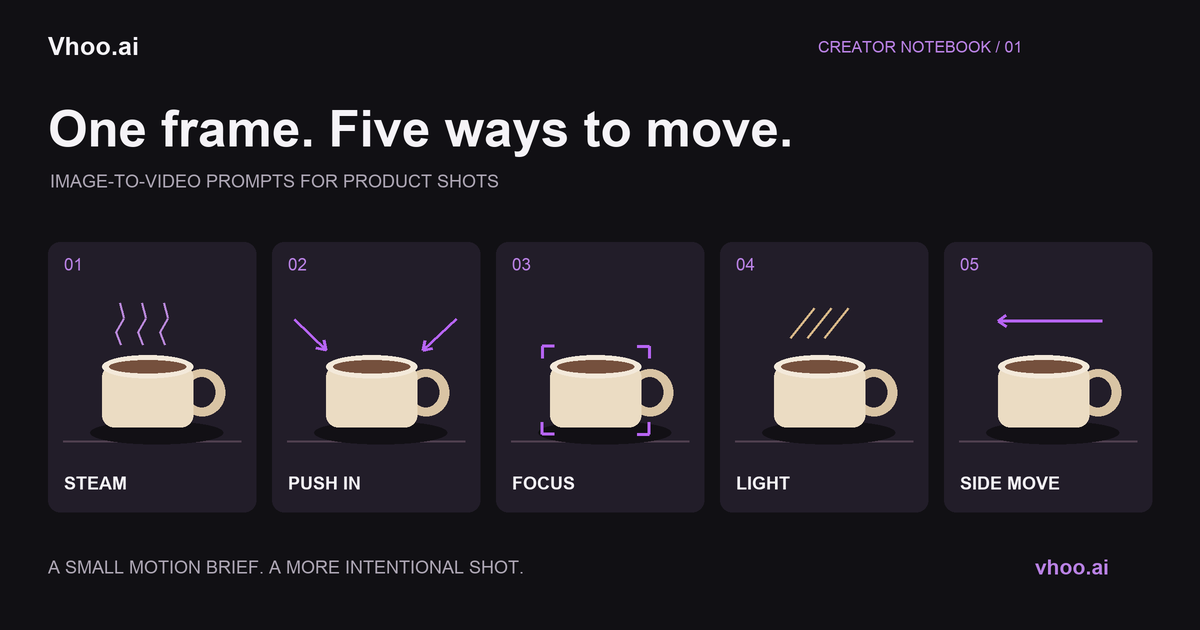
1. Steam: bring the atmosphere to life
A thin ribbon of steam rises gently above the cup and disperses. The cup rests on the table. The camera observes from a fixed position.
Use this version when the café mood matters more than showing a new angle. Check whether the motion stays above the rim or starts affecting the cup itself. An elaborate swirl may be interesting, but it could become the subject of the shot.
2. Slow approach: make the cup the destination
The camera approaches the cup slowly in a straight line. The cup remains on the table, with its handle visible as the framing becomes slightly tighter.
Choose this for a gentle reveal. Compare the first and final frame: does the handle remain in view, and is there still enough context to read the setting? If the ending is too tight, ask for a smaller change in framing.
3. Focus change: direct attention without a large move
From a fixed viewpoint, focus shifts gradually from the tabletop in front of the cup to the front edge of the cup. The background stays soft.
This gives the shot a beginning and an arrival without requesting a tour around the object. Check whether the intended area becomes clearer, or whether the entire image simply softens and sharpens. Those are different visual results.
4. Light change: explore the surface
A soft patch of window light travels slowly across the table and the cup. The camera holds the same composition while the cup remains in place.
Try this as a visual study of the ceramic surface. Keep an eye on the cup’s color: an exposure change may fit the scene, but a new painted pattern would not fit this brief. For an actual product listing, color accuracy deserves particular attention.
5. Small side move: reveal a little depth
The camera moves a short distance to the left, keeping the cup near the center. The cup stays on the table, and the handle remains visible throughout.
Use this when a slight change of perspective helps show the object. Compare it with the straight approach. The side move is useful only if the extra perspective adds something worth keeping in your final edit.
Run a small comparison before spending more credits
In the video workspace, choose keyframes and add your image as the first frame. A generated image can also be sent there with Generate video. Choose an available duration, ratio, resolution, and audio setting; review the credit cost shown before submitting.
Start with two recipes, not all five. Keep the model and output settings the same so the comparison is easier to interpret. Generation can vary even with the same inputs, so treat the result as a creative comparison, not proof that a single word caused a particular change.
| Version | What you changed | What to inspect |
|---|---|---|
| A: steam | Motion above the cup | Rim, handle, steam placement |
| B: slow approach | Camera position | Crop, cup shape, background |
| C: revised favorite | One phrase in A or B | The specific problem you revised |
Keep a short note for each version: keep, revise, or discard, followed by one reason. “Keep: the handle stays readable” is more actionable than “looks good.”
When the shot goes wrong, name the problem precisely
The product changes shape
Write down where you see the change: handle, rim, base, or body. Revisit the first frame at that location, then try a less ambitious shot direction. Avoid judging only from a thumbnail; a useful opening can still lead to an unsuitable ending.
The camera dominates the scene
Compare the result with your one-sentence brief. Try the fixed-view steam recipe as a separate version. If a side move is still your preferred direction, rewrite the requested distance or ending composition instead of adding several competing instructions.
Too many things happen at once
Split the idea into separate attempts. A hand entering, a cup turning, coffee pouring, and a camera orbit are four things to evaluate. First decide which one matters to the intended clip. Keep a list of the others for future shots.
The clip looks polished but does not fit the post
Place it in your intended layout before generating again. Check the crop, the space for your caption, and the moment at which the viewer understands the subject. You may need a different starting composition rather than more motion.
Keep a reusable recipe, not just the final clip
Record your chosen first frame, prompt, model, and settings beside the result. In Vhoo.ai, you can also give a completed creation a name and submit it as a template. Approved submissions appear in community templates.
A useful template name describes the shot: “Café cup — gentle steam” tells another creator more than “Amazing cinematic video.” When you reuse it, revisit the original brief. A prompt that suits a quiet cup scene may need a different action for a shoe, a bottle, or a handmade object.
For your first attempt, choose one image and one reason for movement. Make that reason visible before making the shot more elaborate.